 plots
plotsFeatures · Plan
Plan by bed, by week, by market date
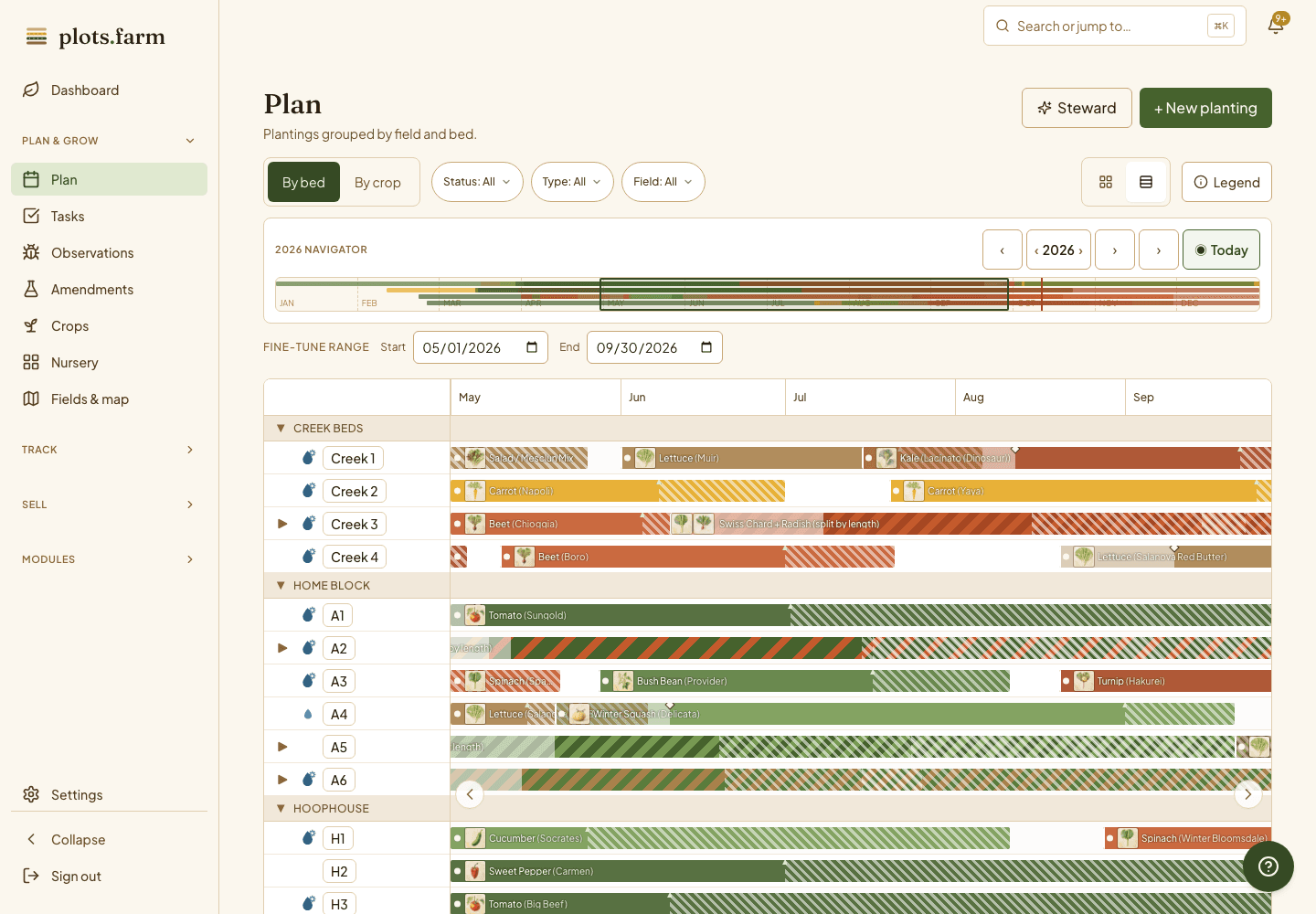
Pick the Saturday you want Sungold on the table and PlotsFarm counts back to the sow date. Successions, interplantings, bed swaps, and the seed order all come off the same plan, and every planting sits on a real bed with real dimensions, so the Gantt, the task list, and the tray count agree.
Backward dates
Start from the market date
You know when you want the crop, not when to sow it. Type the harvest date and PlotsFarm walks back through days to maturity and transplant age to give you the sow date and the transplant date. Change the market date and the whole chain moves. For a succession, set the interval once; each sibling gets its own dates, and an edit to one sibling carries to every unsown member of the chain.
- Harvest date in, sow and transplant dates out
- Successions linked as siblings; edit one, the unsown ones follow
- Catalog days to maturity, or your own override
Frost-aware windows
"After last frost" is a window, not a day
Your frost dates come from your location, and every crop in the library carries its sow window relative to them: spring and fall. So "two weeks after last frost" on your farm resolves to real dates, not a guess. Sow outside the window and the planting card says so. The dashboard shows the next frost on the horizon and a frost-watch banner when a tender planting is in its path.
Bed-width spacing
Your bed is not 30 inches
Most planners assume a 30-inch bed and hide the math. PlotsFarm takes your bed width and the crop's row spacing and computes rows per bed for that bed. A 48-inch bed of carrots plants differently from a 36-inch one, and the plant count, the seed count, and the expected yield all follow from it. Allocate by bed length or by row; either way the seed order is right the first time.
Interplanting
Two crops, one bed
Split Bed 8 between radish and a slower carrot, or give the first 20 feet to one planting and the rest to another. Each planting keeps its own dates, tasks, and harvest log, while the bed shows both on the occupancy view. The crop library carries companion and antagonist pairs, so a planting that clashes with its neighbor is flagged before anything goes in the soil.
- Partial-bed plantings by footage
- Companion and antagonist pairs checked at planning time
Reflow
Swap two beds in one move
The tomatoes need the bed with the trellis, and the brassicas were already planned there. Swap the two plantings and the dates, the tasks, and the successions move with them. Rotation history stays in view: if the swap puts a family back on the bed it grew in last year, the plan-health rules flag it. Move a sow date by three days and the transplant, harvest, and task dates cascade with it.
Supplies from the plan
The seed order, totalled
One page adds the season up: seeds per variety, split between tray-grown and direct-sown, with the nursery safety margin and germination rate already applied. Trays by size, drip tape in linear feet, soil mix in cubic feet. For nursery crops PlotsFarm picks the smallest standard tray that fits the seed count, so 133 seeds never land in a 128-cell tray. Print it clean and hand it to the seed company.
- Seeds, trays, tape, and soil mix from the plantings themselves
- Standard tray sizes: 32, 50, 72, 128, 200, 288
- Chrome-free print view
More in crop planning
Crop library
Vegetables, herbs, and cut flowers with spacing, days to maturity, frost class, and yield per row foot.
Farm overrides
Your kale is not the catalog's; override once and every future planting inherits it.
Rotation history
Every bed remembers its last seasons and warns on a family planted back to back.
Cover crop in one tap
Pulled the bed? Rye goes down from the bed itself, no full planting form.
Season Gantt by bed
Every bed stacked, every planting from sow to harvest; the gaps show as white space.
Pulled the bed early
End a planting the day the crop fails; the bed frees up and the harvest records stay.
Running intensive beds on 0.5 to 10 acres? See how market gardeners plan the season in PlotsFarm.
PlotsFarm for market gardeners →Works with
Pricing
Start on the free tier
Free is a plan, not a trial. Plan the season, work the task list, log harvests, run a CSA and an online store, and take payments, with no subscription and no card. Selling carries a per-transaction fee; the numbers are on the pricing page.